Kennel software that knows which run every dog is in
Draw your facility once. After that, the same floor plan drives the occupancy board, the front desk, the day's care schedule and the card on the run door. No whiteboard, no clipboard, no second copy of anything to keep in sync.
HeelYeah! is the all-in-one platform for the whole client journey, from first inquiry to lifelong client. It captures leads through your own funnel, then runs sessions, classes, board & train, day training, homework, and billing in one place, so you win more clients and the ones you win actually stick.
Start free · No credit card · No commitment
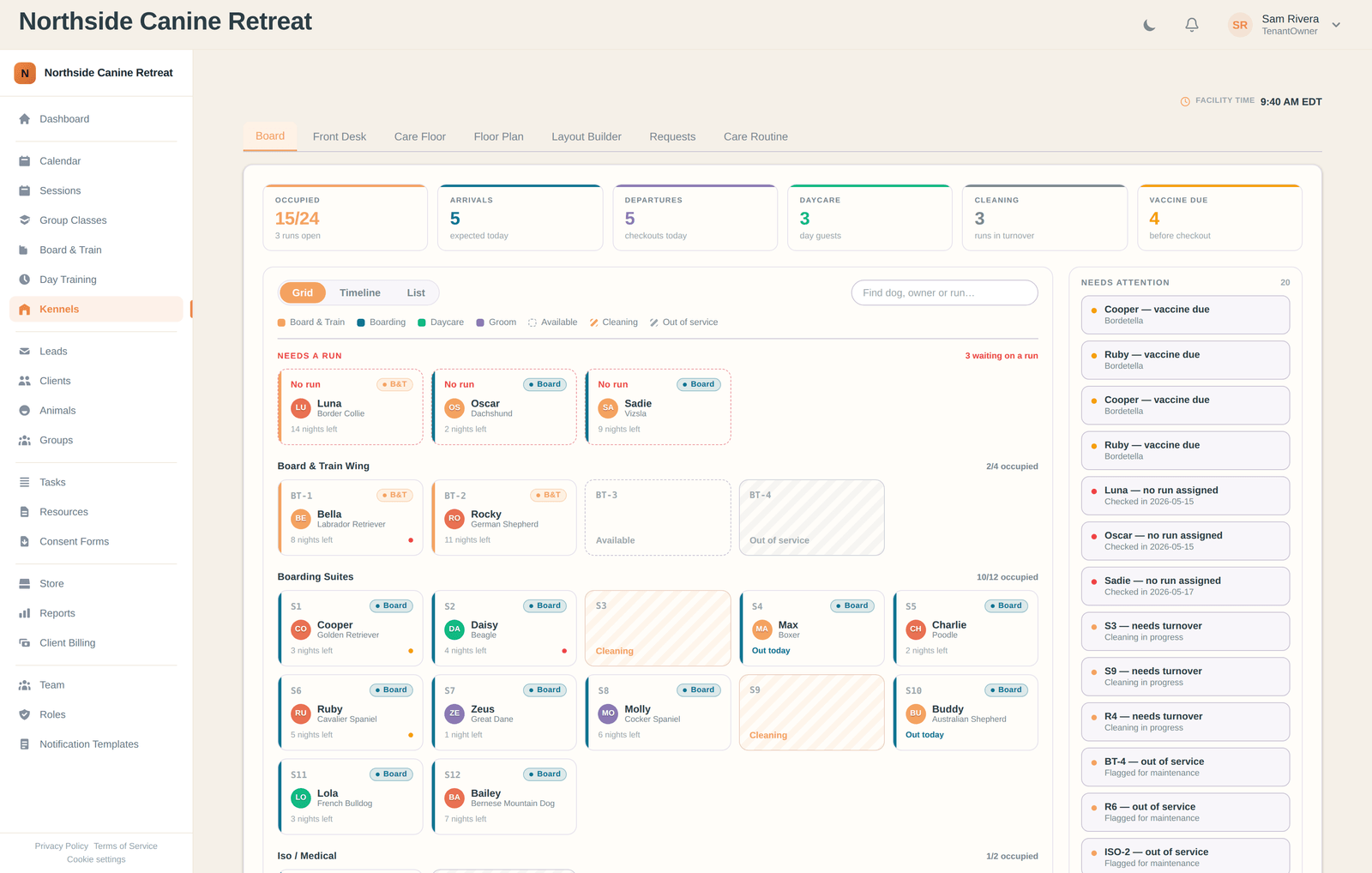
One floor plan, the whole building
Every kennel screen reads the same layout, so occupancy, availability, care and paperwork can never drift apart.
Interactive Kennel Builder
Drag standard runs, boarding suites, isolation and medical runs, play yards, rooms and wall labels onto a snapping grid, resize them to the real thing, and group them into named zones like a Board & Train wing or a boarding aisle. Each run can be limited to the stay types it actually suits, and a run with a dog in it cannot be deleted out from under the stay.
Live Occupancy Board
Every run in the building on one screen, in grid, timeline or list view, colour-coded by stay type. Occupied, arrivals, departures, day guests, runs in turnover and vaccines due across the top, and a rail at the front for any dog booked in but still waiting on a run.
The Needs-Attention Rail
The things that bite you at 5pm, listed before they do: a vaccine expiring before checkout, a dog with no run assigned, a run that has been in turnover all afternoon, a run flagged out of service, a double-booked run, and care that came due and was never ticked. Flip any run to available, cleaning or out of service from the floor plan and it stops being offered as free capacity until somebody finishes the turnover.
Front Desk That Runs The Door
Today's arrivals and departures side by side with vaccination status on every row, the in-house list, and an availability finder that answers "have you got room for a Great Dane the week of the 14th?" in one query. Check in, check out, assign or move a run without leaving the screen.
The Care Floor
The whole building's feeding, medication, turnout, potty, play and grooming for the day, grouped into morning, midday and evening, with the dose and the amount on the row so nobody has to go and look it up. Tick it as it happens; anything that came due and did not get done surfaces on the board.
Printed Kennel Cards
Feeding plan, medications, belongings, care schedule and notes on one sheet for the run door, offered for printing the moment the dog is checked in. Every print re-renders from live data, and once a dog's schedule changes the board flags the card as needing a reprint, so nobody works off yesterday's paper.
A House Routine Every Dog Inherits
Set the facility's feed, medication and turnout slots once and every boarding dog picks them up automatically. Any dog can be adjusted on top of it, and those adjustments keep their identity when you change the house routine, so a dog on an 18:00 turnout the rest of the building stopped doing still gets one and says so.
Boarding Requests, Queued
Clients request a stay from their own portal, a run is held for it automatically, and it waits in a Requests queue with the closest to expiry at the top. You approve or decline; approving raises the invoice at your per-night rate. Turn client-submitted requests off whenever you want.
A day in the building, in order.
- ✓Before the day starts: the board says who is arriving, who is leaving, and whose vaccines expire before checkout
- ✓The dog arrives: check in at the desk, confirm the feeding and medication with the owner, print the kennel card as the dog walks to its run
- ✓Through the day: the care floor lists every feed, dose and turnout in the building, ticked off as it happens
- ✓Anything missed: raised on the board rather than discovered tomorrow
- ✓A run empties: flip it to cleaning, and it stops being offered as free space until turnover is done
- ✓A client asks for next month: their request queues up with a run already held against it, waiting on your yes
- ✓The dog goes home: check out at the desk, and the balance is collected against the stay
A look inside the kennel
Four of the screens your staff will live in.
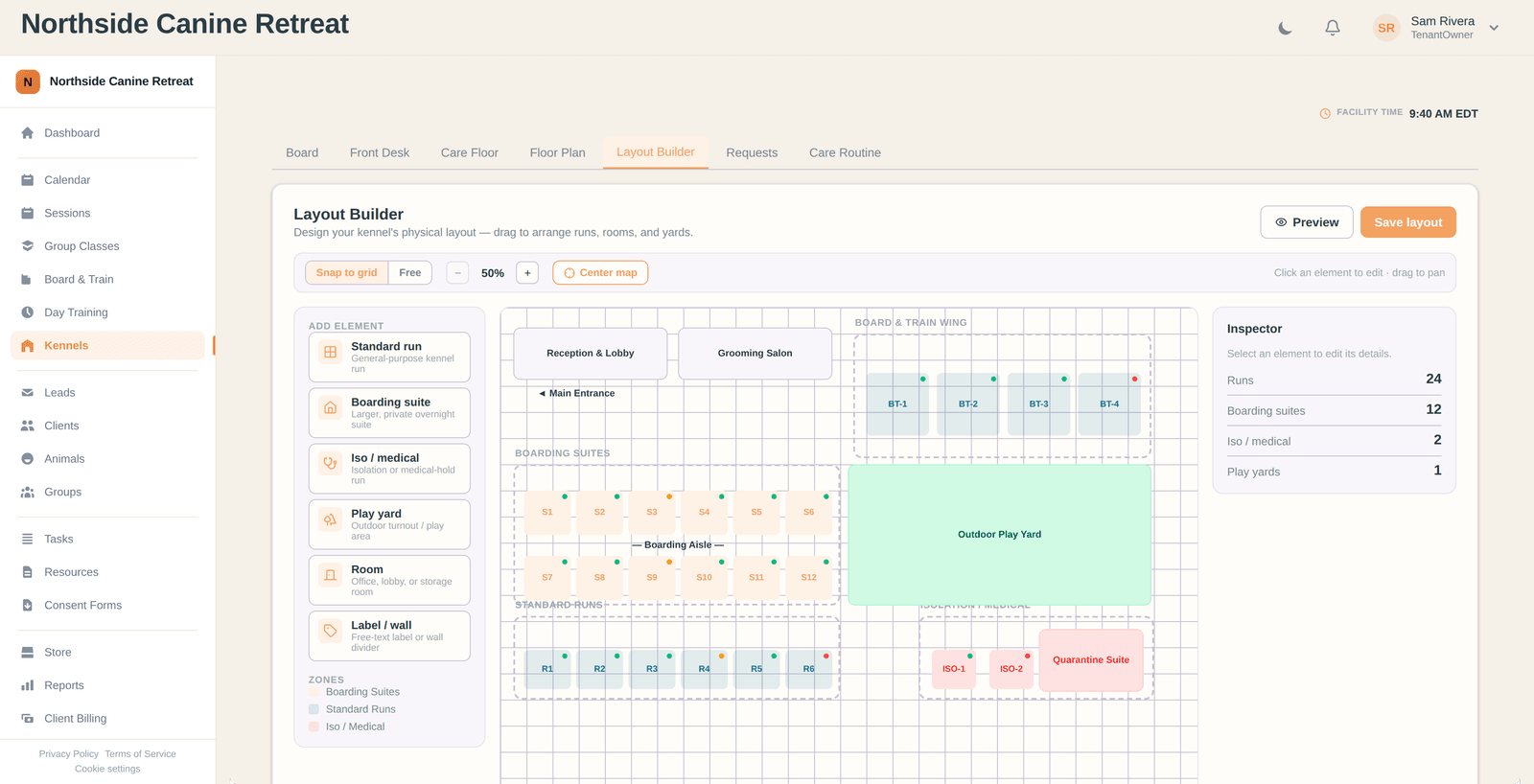
Draw your facility
Runs, suites, isolation, yards and rooms, dragged into place and grouped into zones. Everything else reads this one plan.
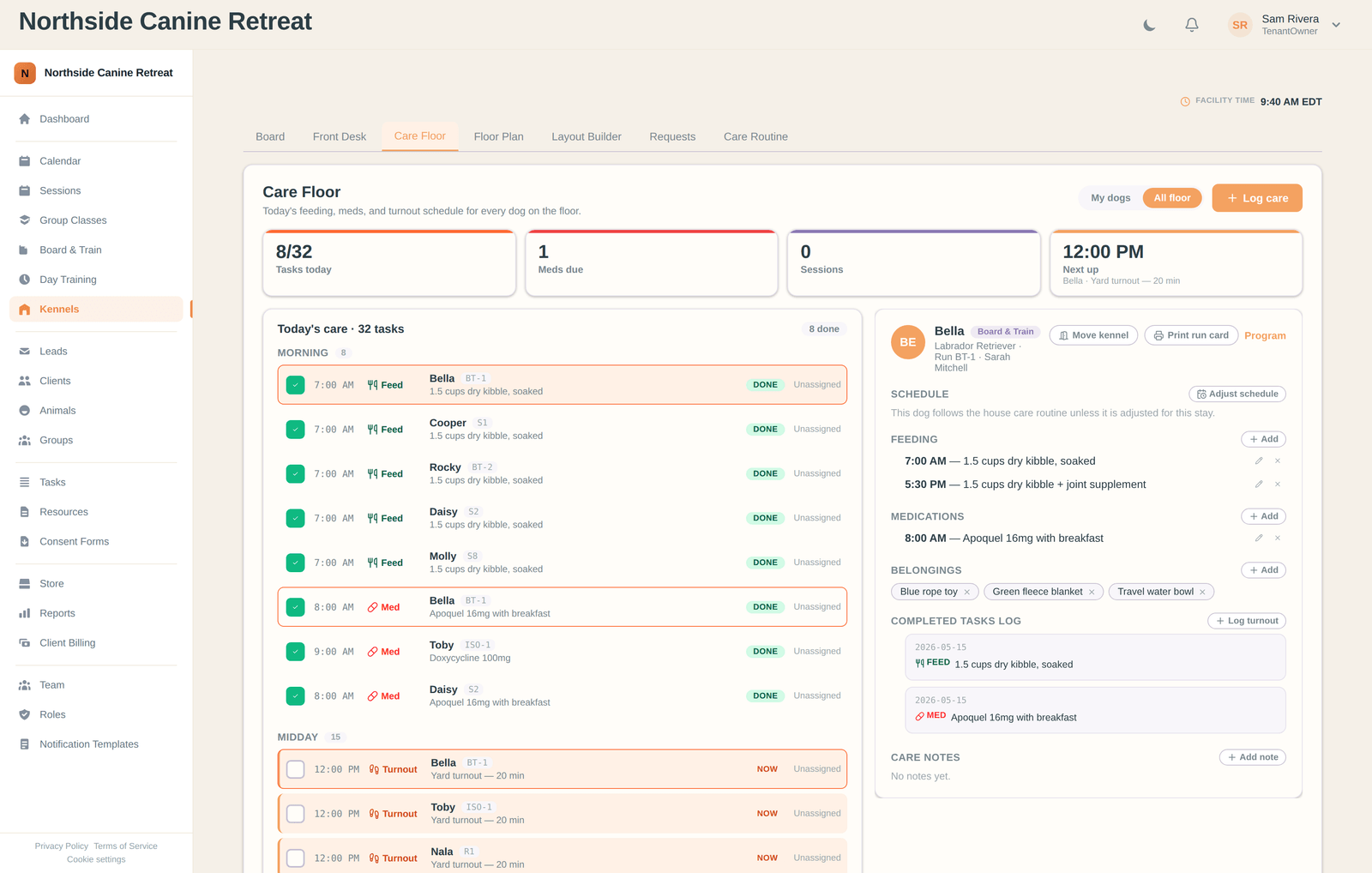
The care floor and the kennel card
Today's schedule for the whole building on the left, the selected dog's feeding, meds, belongings and log on the right, printable for the run door.
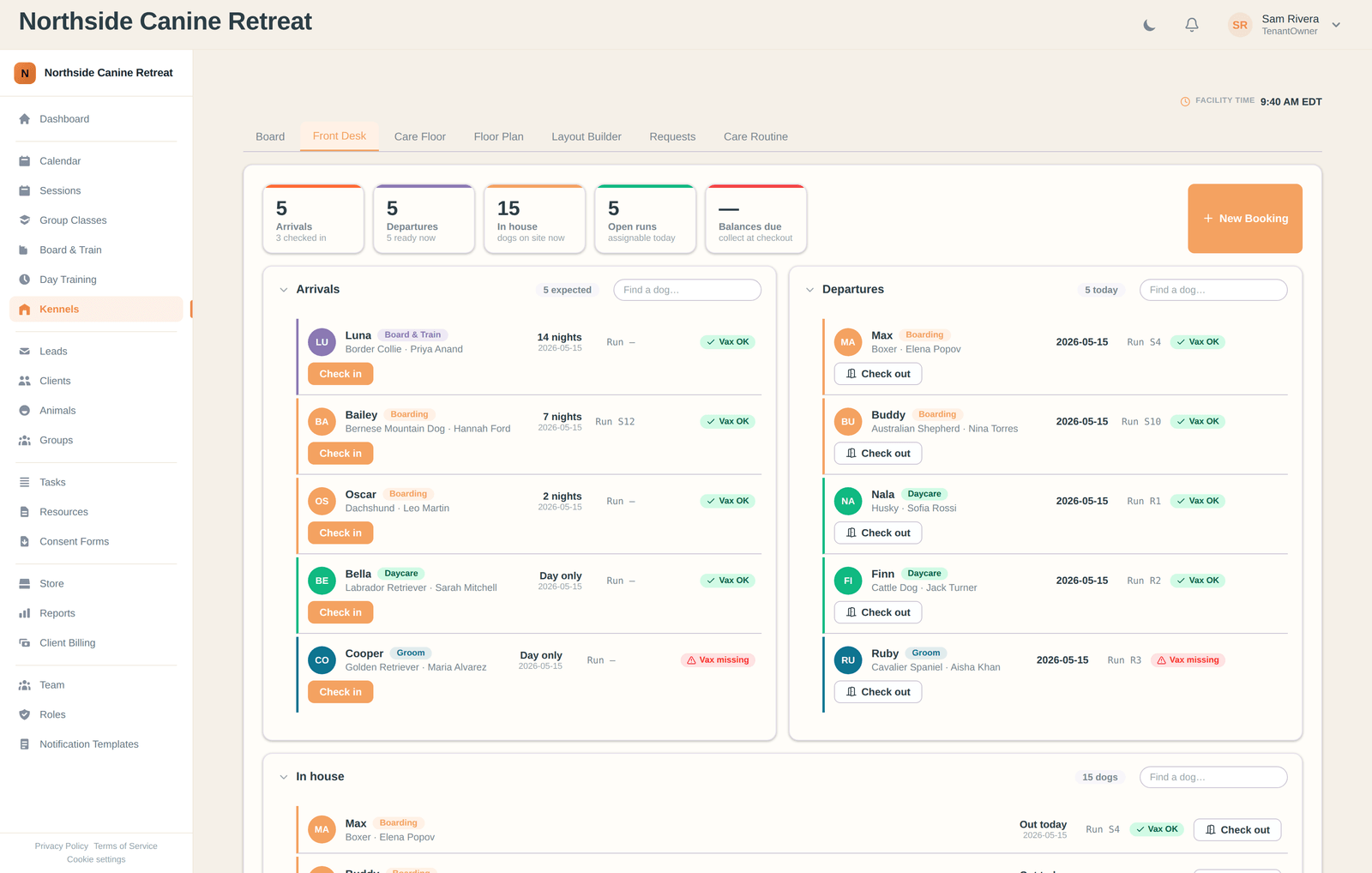
Arrivals and departures
Who is coming in, who is going home, vaccination status on every row, and check-in or check-out one click away.
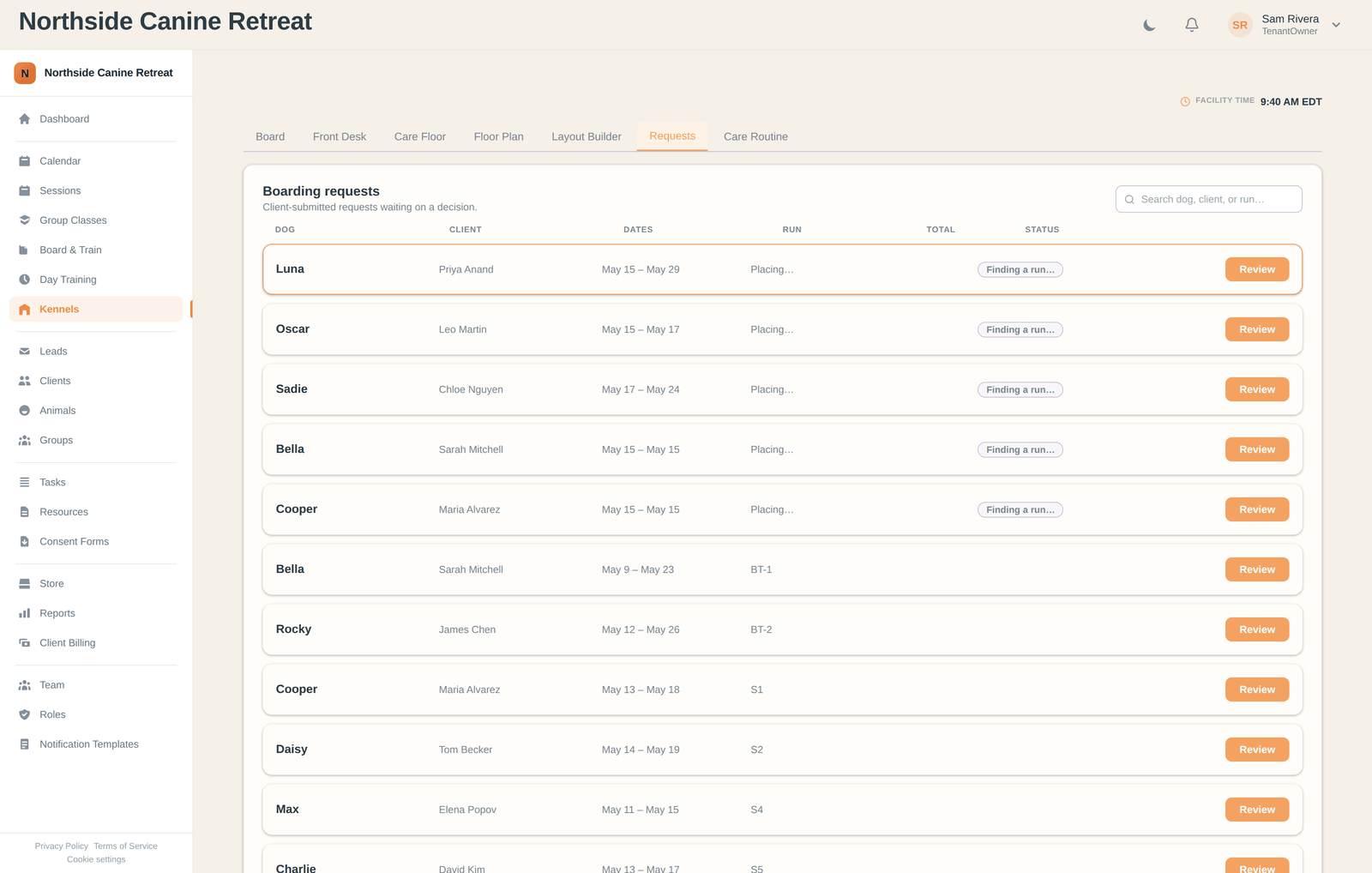
Requests waiting on you
Client-submitted stays with a run already held against them, ordered so the one closest to losing its hold is always next.
Kennel management questions
Run your kennel out of one floor plan
Start free and see what HeelYeah! can do for your facility.
Start free · No credit card · Direct line to Nick